Case study · 01

SusTern AI-Commerce

The work around a product matters as much as the product itself. SusTern AI-Commerce connects product information, branded storefronts, and connected workflows for specialty businesses — retailers, distributors, and manufacturers.

Role
Product & UX design lead
Company
SusTern
Timeline
2025 — present
Scope
Platform concept, flows, design system, strategy

In shortPitched the platform, designed the system — one catalog for retail and wholesale; storefronts, admin, and the network shipped.

01

The scene: the work around a product

A specialty furniture retailer has outgrown template commerce. Their catalog doesn't fit the boxes — variants, bundles, supplier relationships, lot tracking. Their business is two businesses: retail customers on the storefront, distributors on the wholesale side, both needing the same inventory truth. And the team running it all is two or three people.

Around every product, more people: a customer reorders by texting a photo of a chair; a supplier answers a quote on a call; a receiver confirms a delivery by replying "YES." None of them have an app installed, a login, or a minute of training.

SusTern AI-Commerce is the system behind all of it. Product information is the source of truth, branded storefronts are the public face, and connected workflows are how the work gets done — with human review wherever trust matters.

The platform began as a proposal. I joined SusTern to work on its first product, noryX — and the more I saw, the more potential I found. I brought the first version of the AI-Commerce platform to the team to make the case that we could do so much more. It landed: an exceptional small team, some strikingly good ideas, and a founder willing to bet on them. My job since has been to design the system: its flows, its language, and the moments where AI proposals become human decisions.

The pitch came with a working prototype — open the original build I used to make the case (Figma Make prototype · demo data · opens in a new tab)

02

The constraints

  • Many businesses, one product.One storefront codebase and one admin serve many merchant brands. Identity has to flex without forking the platform.
  • B2B and B2C, one model. Wholesale and retail are the same catalog, the same stock, the same money.
  • No app. No training. No login.Floor workers, suppliers, and customers interact through voice, SMS, and signed links — the channels they already live in. If a flow needs an install or a manual, it's designed wrong.
  • AI as an actor — with a human at the commit.The system drafts, classifies, and proposes. People approve. Every automated step has to be inspectable, because operators are the ones accountable for what the system does.
03

The decisions

Channels people already use become product surfaces

The bet

Treat voice, SMS, and links as first-class interfaces: product photos in by MMS, order summaries and payment links out over SMS, registration gated by a one-time code during a call. The phone line isn't support — it's a storefront.

Why it won

Every install is a wall, and training doesn't survive staff turnover. Designing for the channels people already carry means adoption is never a prerequisite — the interface is already in their pocket. And the same intents flow into the same backend as the admin, so the business keeps one version of the truth.

The alternative we rejected

A companion app with an onboarding funnel, and “call us” as the fallback path for everyone else.
One workspace, scoped to context

The bet

A single admin shell where you select the client namespace and the facility — and see only what your scope allows. Requirements appear as guidance (“requires a namespace, facility, and active grant”), not as disabled walls.

Why it won

A small team can't maintain parallel products. One design language means one pattern library, one set of fixes, and screens that stay simple because context — not extra code — decides what's shown.

The alternative we rejected

Separate tools or skins per persona — provider, merchant, manufacturer.

One catalog, both buying modes

The bet

Model the catalog once — variants, volume pricing, supplier relationships, lot tracking — and let pricing, availability, and packaging rules differ by buyer group.

Why it won

Specialty retail lives on both sides of that line; splitting the model splits the truth. One catalog keeps stock honest and lets a merchant quote a distributor from the same screen they sell from.

The alternative we rejected

A separate B2B portal bolted onto a B2C store.

AI drafts; the operator holds the pen

The bet

AI generates and proposes — product descriptions, SEO, campaigns, imports, restock suggestions — but consequential steps resolve to an explicit human decision, with sources and reasoning one reveal away.

Why it won

Small teams defend every choice they ship. Automation earns trust by being visible: the draft is a draft, the proposal explains itself, and the human keeps the pen.

The alternative we rejected

Full automation for speed, or a chat box bolted onto the side of the product.

What we said no to

  • A companion app — anything that needs installing or training
  • A separate B2B portal — splitting the catalog would split the truth
  • Silent automation — full auto-apply with no human at the commit
04

The work

Figures below mix labelled reconstructions with sanitized product captures (demo workspace). The label carries the distinction.

Intake pipeline
Channel
Voice · SMS · MMS
Captured
Intent + items
Drafted
AI proposes the action
Confirmed
Human decides
ReconstructionFrom channel to action: voice, SMS, and photo intake all resolve into the same pipeline — captured, drafted, confirmed.
SMS — customer line
Tuesday 9:41 AM
Can I reorder the walnut dining set from last spring?
[ photo ] walnut-chair.jpg — sent by customer
Customer · 9:41 AM
Of course — 1× Walnut Dining Set, delivered to your usual address.Secure payment link
SusTern · 9:42 AM
Order placed — thank you!
Customer · 9:44 AM
ReconstructionA reorder handled entirely in a text thread — photo in, order summary and payment link out. No app, no login.
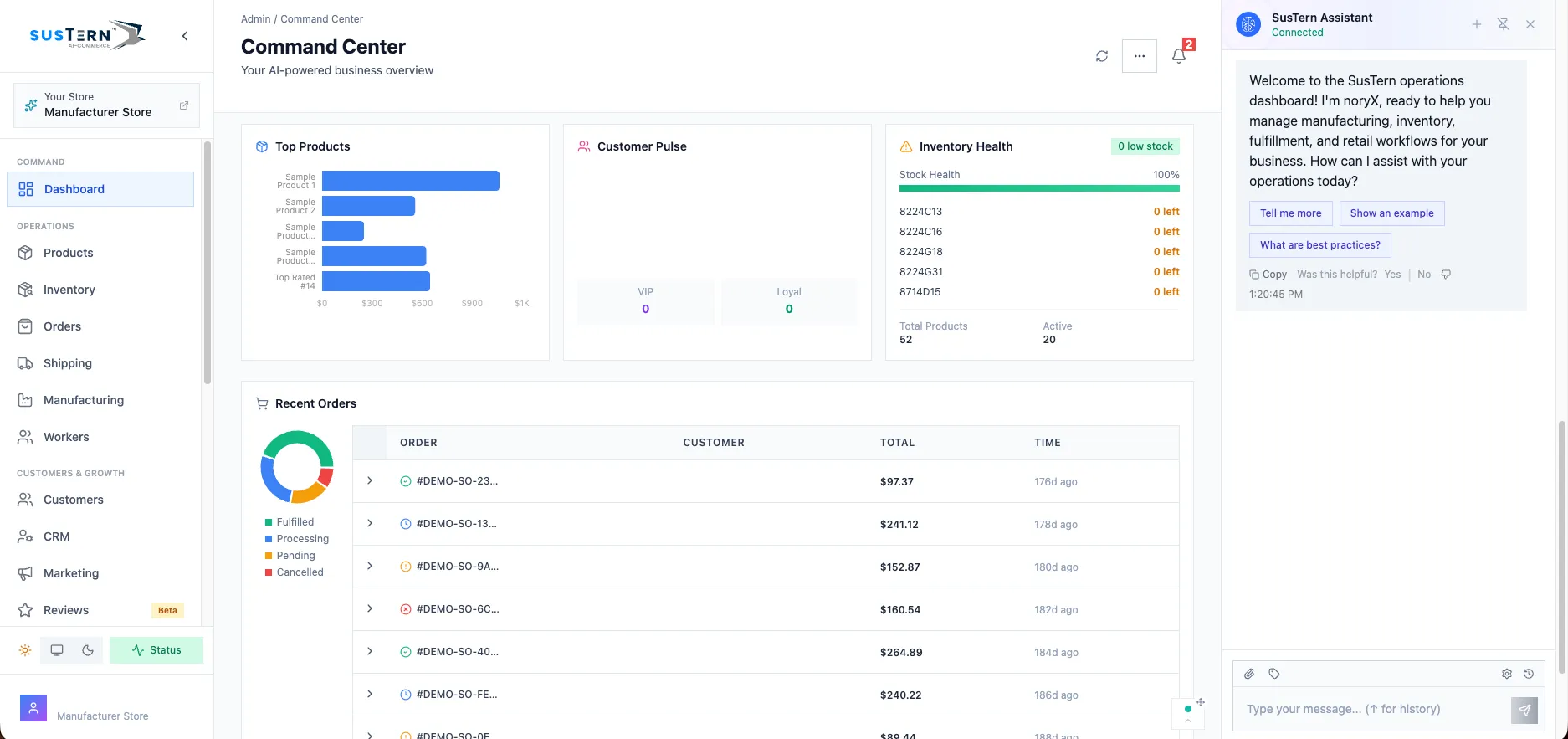
Merchant admin command center: top-products chart, customer pulse, inventory health, recent orders with a status donut, and the assistant panel open
Sanitized captureThe admin overview — one workspace for the whole business: top products, inventory health, recent orders, and the assistant in reach.
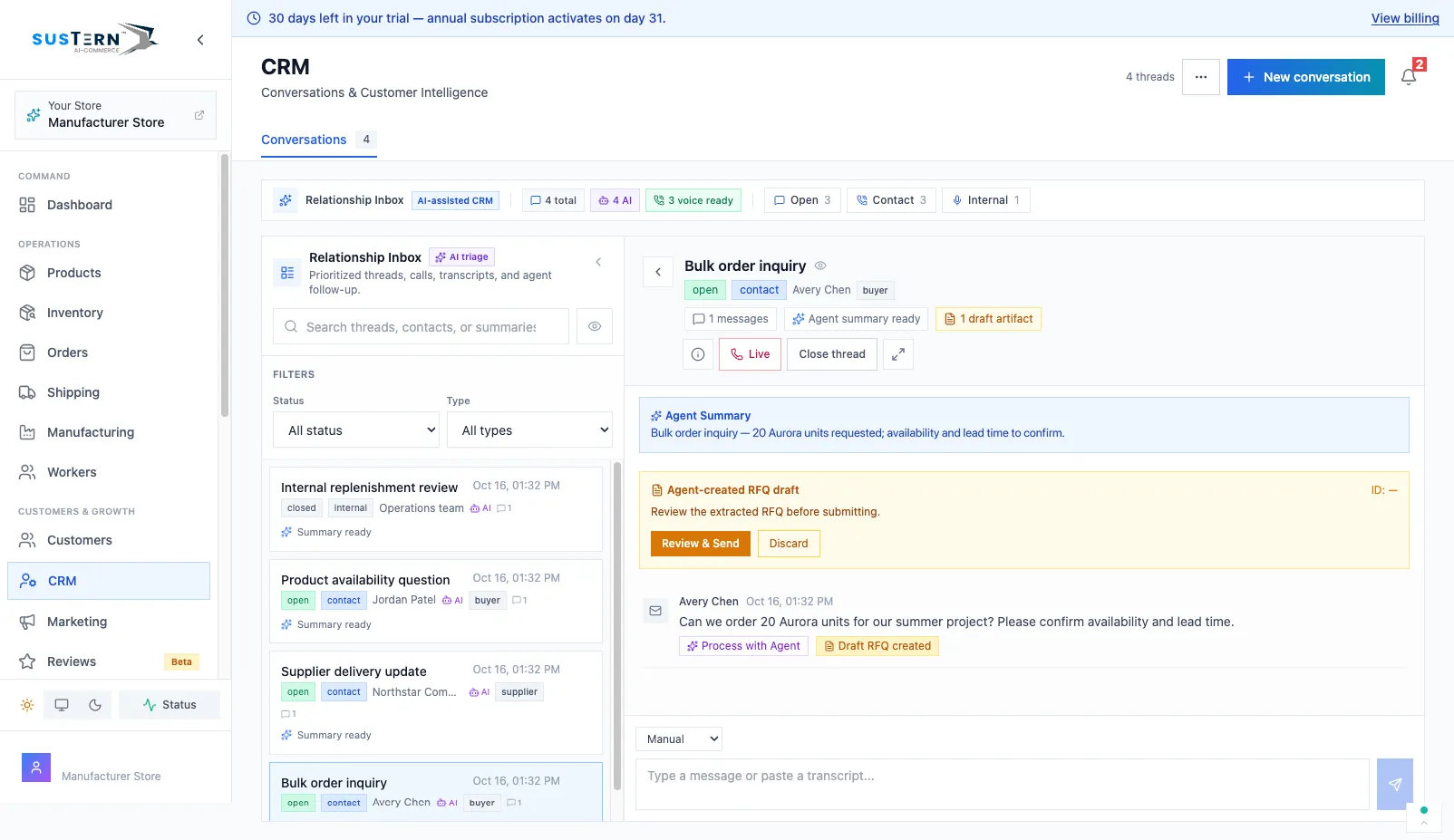
CRM relationship inbox with a bulk-order thread: an agent summary, an agent-created RFQ draft with Review & Send and Discard actions, and the customer message that triggered it
Sanitized captureAn AI proposal in context — the agent reads the conversation and drafts the RFQ with its summary; the operator decides in the thread: Review & Send or Discard.

Open full sizeTap a number to read the note.

  1. The summary states the ask in one line: 20 Aurora units, availability and lead time to confirm.

  2. The RFQ is staged with its source; nothing is sent until the operator reviews it.

  3. Review & Send or Discard — the decision stays in the thread, with the proposal attached.

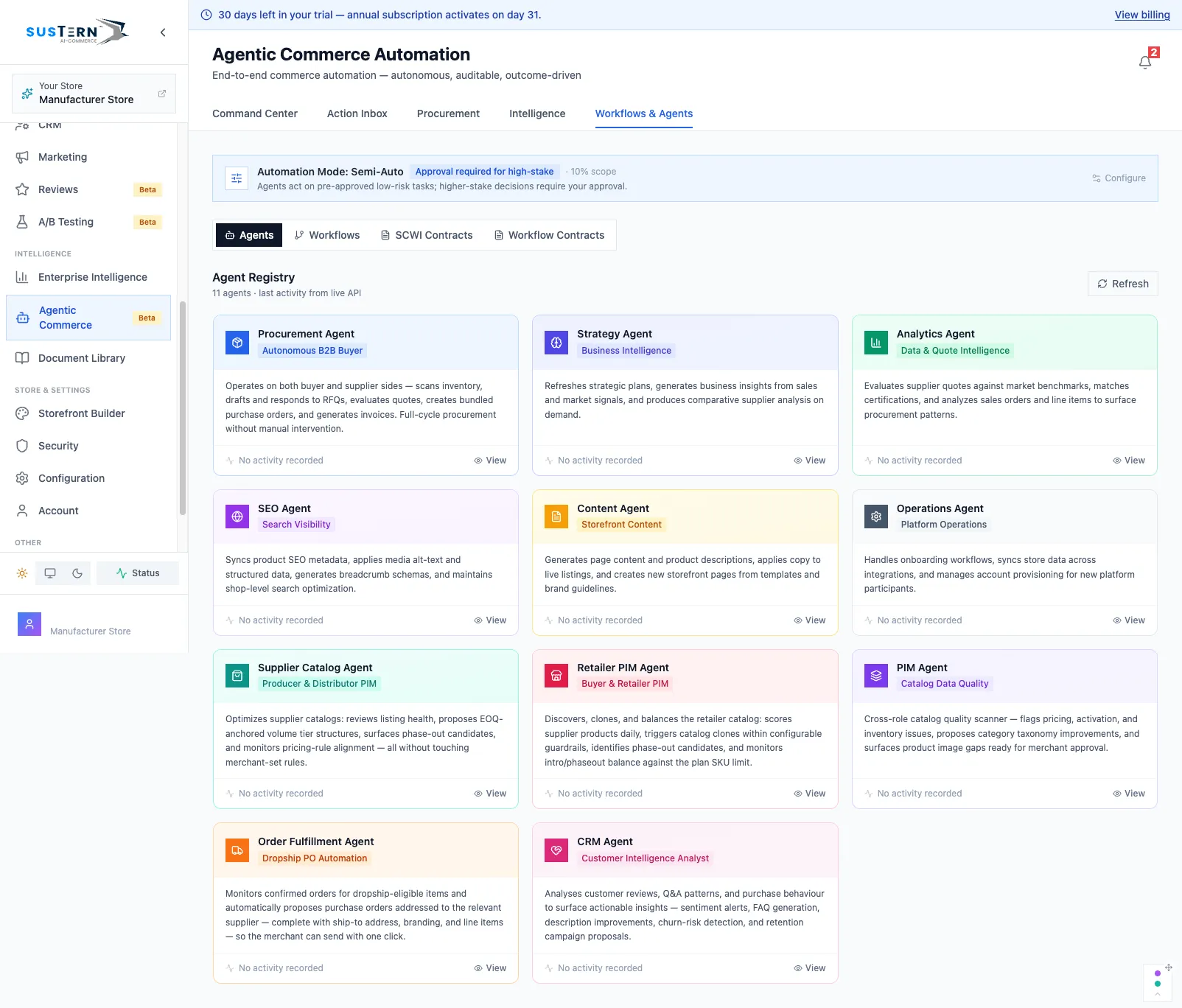
Agentic commerce automation, Workflows & Agents: a semi-auto automation-mode banner with approval required for high-stake, above a registry of eleven agent cards spanning procurement, catalog, storefront, operations, and CRM
Sanitized captureEleven agents, one approval model — the registry keeps every automation a named actor: low-risk tasks run pre-approved, higher-stake decisions wait for the operator.
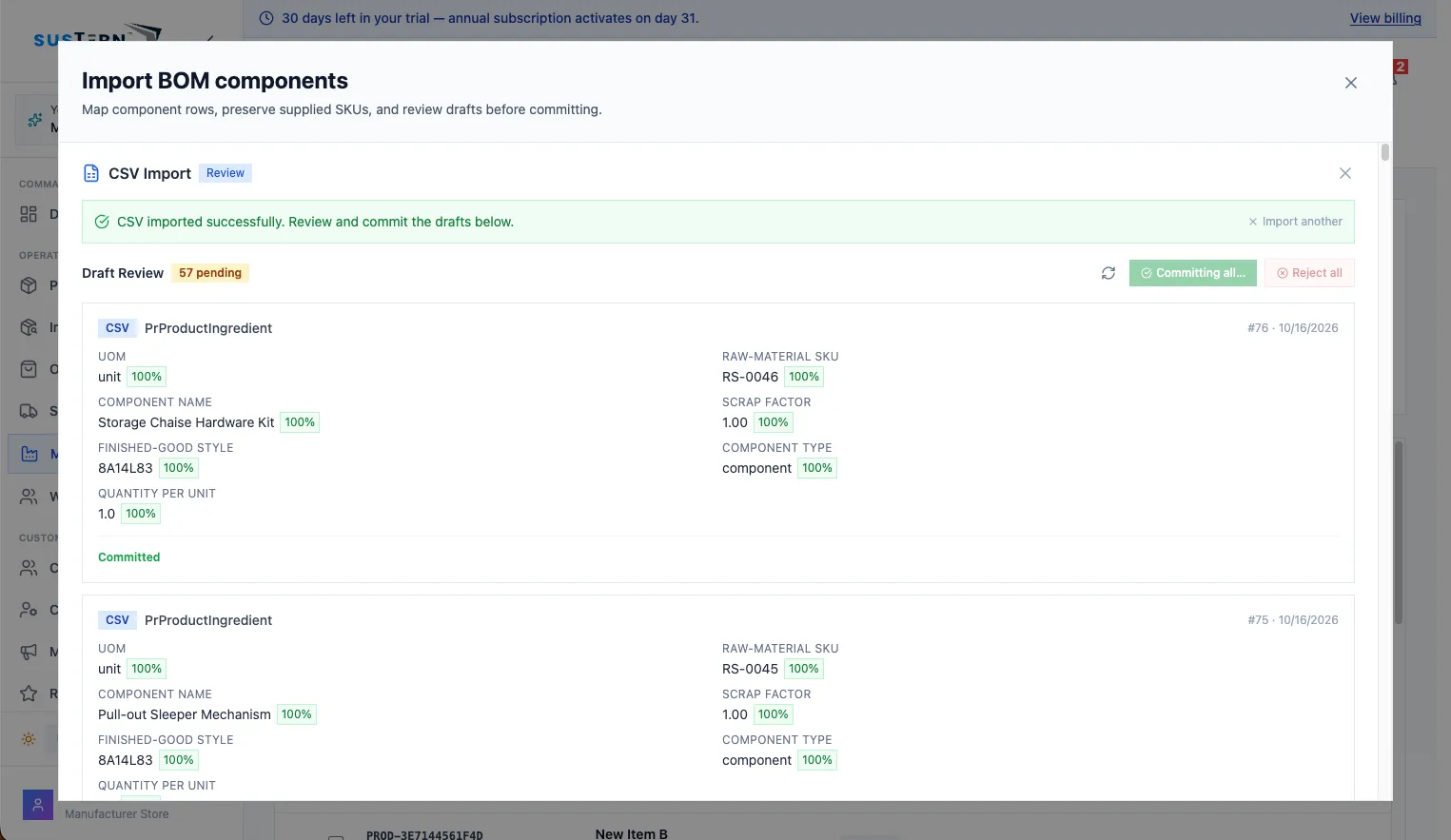
Import BOM components review: a CSV import summary with 57 pending draft rows, each field carrying a confidence chip, committed rows marked, and Commit all and Reject all controls
Sanitized captureImport in the admin — the AI drafts every row with field-level confidence; nothing commits until the operator reviews.

The network behind the catalog: the platform's public face is its showcase portal, where manufacturers, distributors, and buyers present their products and find each other. Product information is the first sales channel — the storefront is the context layer that turns browsing into a conversation.

How this shipped

  1. Audit

    Every surface reviewed against one design language as the platform grew

  2. Decide

    One shell, one catalog, one vocabulary — alternatives documented

  3. Ship

    Storefronts, admin, and network shipped without forking the product

  4. Govern

    The pattern library versioned; new surfaces assemble from canonical parts

05

Impact & status

Shipped and evolving. Merchant storefronts run on the platform today — catalog to checkout — with the admin behind them and the showcase portal connecting manufacturers, distributors, and buyers. Recent work rarely comes with public metrics at this stage, so here's what I'd point to instead: one catalog model now serves retail and wholesale without divergence; the no-training constraint held all the way to production; and the admin stayed one system as the surface count grew.

1admin shell, every role
1catalog, both buying modes
0per-merchant forks
4workflow stages, one system

The polished marketing version of the platform lives at its showcase portal; this is the design version.

06

What I'd do differently

I'd push the pattern library even earlier. We committed to a governed design system a few months in; every week before it was paid for in inconsistency I had to clean up later.

And I'd sequence catalog ingestion sooner. We designed the storefront first because it's visible — but the import pipeline is where merchant trust is actually won. Bad data makes every screen a lie.